
Download WordUp – AI‑Powered Vocabulary Builder for English Learners
Overview & Why WordUp Stands Out
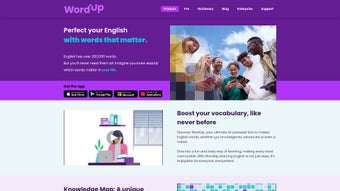
WordUp is an AI‑driven vocabulary application crafted to help English learners boost their lexical repertoire quickly and enjoyably. Unlike generic flash‑card apps, WordUp blends cutting‑edge natural language processing with a visually rich learning environment. The platform serves beginners, intermediate speakers, and advanced students preparing for high‑stakes exams such as IELTS and TOEFL.
Central to its approach is the “Knowledge Map,” an interactive dashboard that visualizes each learner’s progress, highlights knowledge gaps, and suggests the next set of words to master. WordUp’s AI teaching assistant, Lexi, delivers instant pronunciation feedback, while the “Fantasy Chat” feature lets users practice conversation with AI‑generated personalities of famous celebrities, making repetitive practice feel like a game. By incorporating videos, vivid illustrations, idiom explanations, and customizable example sentences, WordUp turns vocabulary acquisition from a rote task into an immersive experience.
The app also offers targeted exam‑preparation modules, enabling users to focus on high‑frequency words that appear on standardized tests. In short, WordUp combines personalization, engagement, and exam relevance into a single, secure, and regularly updated tool that can be downloaded for free on multiple platforms. Moreover, its cloud‑based sync ensures that learners can pick up exactly where they left off, whether they switch from a laptop at home to a smartphone on the bus, guaranteeing a seamless learning journey across devices.
Key Features, Installation & Platform Compatibility
Core Features that Power Your Learning
- AI‑Powered Word Recommendations: Lexi analyses your usage patterns and suggests words you’re most likely to forget, ensuring efficient study sessions.
- Pronunciation Coach: Real‑time speech recognition compares your pronunciation to native speakers and offers corrective tips.
- Knowledge Map Dashboard: Visual progress tracker that displays mastered words, pending words, and thematic clusters for deeper understanding.
- Exam‑Focused Modules: Curated word lists for IELTS, TOEFL, GRE, SAT, and other English proficiency tests, complete with practice quizzes.
- Multimedia Learning: Each word is accompanied by high‑resolution images, short explanatory videos, and example sentences that can be customized.
- Fantasy Chat: Interact with AI versions of celebrities, historical figures, or fictional characters to practice conversational English in a fun context.
- Idioms & Phrasal Verbs Library: Dedicated sections for idiomatic expressions, complete with cultural notes and usage examples.
- Offline Mode: Download word packs for study without an internet connection, perfect for commuters or travelers.
- Secure Cloud Sync: All progress, settings, and personalized word lists are encrypted and stored securely, complying with GDPR and other privacy standards.
- Regular Content Updates: The development team releases new word packs, exam modules, and feature enhancements every month, keeping the learning material fresh and relevant.
Step‑by‑Step Installation Guide
Getting started with WordUp is straightforward and takes less than five minutes:
- Visit the official WordUp website or your device’s app store (Google Play Store, Apple App Store, or Microsoft Store).
- Click the “Download” button; the app size is approximately 120 MB, making it suitable for most devices.
- After the download completes, open the installer and grant the required permissions (microphone for pronunciation, storage for offline packs).
- Launch WordUp and create a free account using your email or social login. This step syncs your progress across devices.
- Complete the short onboarding questionnaire that asks about your current level, goals, and preferred exam. Lexi will generate a personalized learning path instantly.
- Enable automatic updates in the settings menu to receive new word packs and feature improvements without manual intervention.
- If you prefer a manual approach, you can visit the “Word Packs” section later to select specific topics or exam‑focused bundles for offline download.
Pro tip: For the best pronunciation experience, use a headset with a built‑in microphone, as it reduces background noise and improves speech‑recognition accuracy.
Supported Operating Systems
WordUp is built with cross‑platform compatibility in mind. The app runs smoothly on:
- Windows 10 and later (x86 / x64)
- macOS 11 (Big Sur) and later
- Android 7.0 (Nougat) and later
- iOS 13 and later (iPhone, iPad)
All versions receive regular security patches and feature updates, ensuring a secure and reliable learning environment. Minimum hardware requirements include 2 GB RAM and 300 MB of free storage for offline packs, while a stable internet connection is only needed during the initial sync and for cloud‑based AI interactions.
Pros, Cons, and Frequently Asked Questions
Pros
- Highly personalized word suggestions powered by AI.
- Interactive Knowledge Map makes progress tracking intuitive.
- Pronunciation feedback is accurate and easy to follow.
- Exam‑specific vocab lists save time for test‑takers.
- Engaging multimedia content keeps learners motivated.
- Fantasy Chat adds a gamified element to conversation practice.
- Free tier provides ample functionality; premium upgrade is optional.
- Offline mode enables learning without internet access.
- Secure cloud sync protects data and allows seamless device switching.
- Frequent content updates keep the material current.
Cons
- Some advanced features (e.g., in‑depth analytics) are locked behind a premium subscription.
- Pronunciation analysis may require a high‑quality microphone for best results.
- Occasional sync delays when switching between multiple devices.
- Limited support for languages other than English, which could be a drawback for bilingual learners.
- The free version includes non‑intrusive ads that can be removed with the premium plan.
Frequently Asked Questions
Is WordUp completely free or does it require a subscription?
WordUp offers a robust free tier that includes core vocabulary learning, the Knowledge Map, and basic pronunciation feedback. A premium subscription unlocks advanced analytics, exclusive word packs, and ad‑free usage.
Can I use WordUp offline?
Yes. After downloading the desired word packs, you can study offline on any supported device. Syncing your progress will occur automatically once you reconnect to the internet.
How does the “Fantasy Chat” feature work?
Fantasy Chat uses AI‑generated personas based on public figures or fictional characters. You type or speak prompts, and the AI responds in the chosen character’s style, allowing you to practice casual conversation while staying engaged.
Is my personal data safe with WordUp?
WordUp follows GDPR‑compliant privacy policies, encrypts data in transit, and stores user information on secure cloud servers. You can delete your account and all associated data at any time.
Does WordUp support exam preparation for tests other than IELTS and TOEFL?
In addition to IELTS and TOEFL, WordUp includes dedicated word lists for GRE, SAT, and Cambridge English exams. New test packs are added regularly based on user demand.
Final Verdict and How to Get WordUp Today
WordUp delivers a compelling blend of AI personalization, engaging multimedia, and exam‑focused resources that make it one of the most effective vocabulary apps on the market. Whether you’re a high‑school student aiming for a better SAT score, a professional polishing business English, or an avid traveler preparing for a language immersion trip, WordUp adapts to your goals and learning style. The Knowledge Map provides clear visual motivation, while Lexi’s pronunciation coaching ensures you sound confident in real‑world conversations.
Although the premium tier unlocks deeper analytics, the free version already offers enough power to see measurable improvement within weeks. Security‑focused updates, cross‑platform availability, and a generous offline mode further solidify WordUp as a trustworthy, lifelong learning companion. Users consistently report higher retention rates and faster vocabulary growth compared with traditional flash‑card methods, underscoring the advantage of AI‑driven adaptive learning.
Ready to upgrade your English vocabulary? Download WordUp now for free on Windows, macOS, Android, or iOS. Install the app, complete the quick onboarding, and start exploring the Knowledge Map today. For users seeking accelerated exam prep, consider the premium subscription to unlock exclusive word packs and detailed progress analytics. Take the first step toward confident, fluent English—WordUp is just a click away.



.png)



